- Exposure mode: aperture priority
- Metering mode: spot metering
- AF-Area mode: single area
The aperture priority is to control the depth of field. If you have to use smaller aperture for group shots (e.g., f/5.6 or f/8), and that does not give you fast enough shutter speed to freeze subject's motion or camera shake, then you will have to either increase the ISO or bring your own light (i.e., flash). The spot metering of D40 will meter off the spot and try to achieve 18% gray at the spot. The "single area" AF mode is to ensure that the spot metering operates as spot metering. If you use "closest subject", the spot metering will work as center-weighted instead and wreak havoc with the metering algorithm.
Now you are all set. From here, you can fine tune your meter in two ways: with an 18% gray card or without an 18% gray card.
If you don't have an 18% gray card with you, point your camera at the subject, get focus lock on the subject, and just before releasing the shutter, you should adjust the exposure compensation, and then release the shutter. In the diagram below, you should press the "Aperture/Exposure" button and turn the "Command Dial", in order to change the exposure compensation. How much exposure compensation? That depends on the tone of your subject's skin. As a rule of thumb, it is +1.0 EV for Caucasians, 0 EV for Asians, and -0.7 EV for African Americans. When you get the hang of it, you should be able to fine tune the exposure compensation number from a quick look at your subject. You can find good reference of this technique here. It will nail the exposure amazingly well. The exposure compensation sounds like one more cumbersome step, but in reality, once you get the hang of it, it becomes second-nature and does not hinder your overall workflow at all.

But even better, carry an 18% gray card with you. They are cheap and small. What I do is expose for the 18% gray card, with the card placed near the subject. It will get the correct exposure, by definition. Once you get a reading, unless the ambient lighting is uneven or changing, you can lock the exposure (with the AE-L button) and take as many pictures as you want. You don't even have to compensate for the tonality of your subject's face when you have the exposure nailed with an 18% gray card at the outset. Below is a picture of what I suggest here, except that you don't need a large sheet of gray like that.

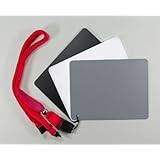
A small set of white/gray/black cards with a lanyard will serve you well. Another trick that photographers use is to use the palm of your hand as a makeshift 18% gray card (as demonstrated here), but a tri-color card set is cheap, easy to carry and can be used to set your custom white balance as well.
Possible problems:
(1) What if exposing for your subject('s face) blows some other part of the scene (like a window)?
With D40's limited dynamic range, this can easily happen. Personally I do not care. I think that is the most important thing in people photography. As long as your subject's face is properly exposed, who cares if a nearby window is blown out of recognition, like below? Spot metering is perfect for properly exposing for the subject's face. (It is also demonstrated here.)

If you should insists on "fixing" this, there are a few ways to do it, which would apply to any scene with a dynamic range that the camera can't handle. One, you can bring more light to your subject and close the gap between your subject and the bright part of the scene. A fill flash or reflector will do this. Two, you can change the composition so that the bright object no longer constitutes a part of your photo. Three, you can underexpose for your subject, if you feel the result still does your subject justice and conveys the mood of the scene better. (I sometimes do this.) Four, (you can combine this with number three) underexpose your subject to save the highlight and then bring up the exposure of your subject while still saving the highlight in post-processing. (Think Lightroom or Aperture). It is laborious, however, and I try to stay away from it, although I shoot raw.
(2) What if exposing for your subject('s face) makes dark area of the scene too dark?
See (1) above. Who cares?
What about histogram?
There is a great myth about histograms. There are a lot of people who think they know how to use histogram, but they don't. If you know how histograms work and think histograms can help you in people photography, please by all means use them.
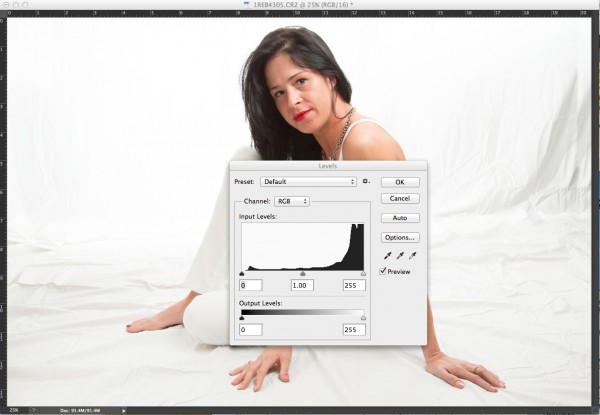
Personally, I do not think they are of much help, especially when my style of people photography is to expose correctly for the subject's face and let the rest of the scene fall where they will even if overexposed. Histograms are helpful only when you know what to expect from the histogram so that you can change the exposure to approximate that desired histogram. In people photography taking place at various settings - not only will the ambient light be variable and unpredictable, but, more importantly, the rest of the scene will be vastly different from one scene to another - there is no telling what your desired histogram will look like. (Just take a look at the portrait below and its histogram. Can you work with the histogram to nail the exposure? No way. Because you have no idea where your subject's skin tone, which is the most important exposure, falls.) I think histograms have value in other types of photography - like landscape. If you can really convince me that histograms help people photography, then I'd like to see some evidence.
(On a side note, some may argue that when you shoot to right, or ETTR, the histogram will be indispensable. Well, I still do not agree. First, ETTR necessarily involves shooting RAW and working on a computer. For recreational, casual photography, making computer work routine just takes the fun out of photography. Second, more importantly, when the scene is backlit, ETTR will severely underexpose your subject in an attempt to save the highlight. Raising the brightness of your subject in PP will introduce a lot of noise that was not necessary. This happens because ETTR relies on the histogram, which does not tell you which spike comes from where.)


No comments:
Post a Comment